The name of the preview assigned to the sequence is the second item shown on the toolbar. When you click on the preview name, a menu opens. The items on that menu are described in this topic.
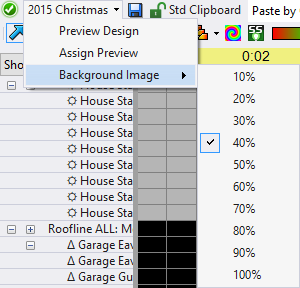
The Toolbar's Preview Menu
Preview Design
This menu item opens the sequence's preview for editing in the Preview Design window.
Assign Preview
This menu item allows you to associate a different preview to the current sequence. This function works best if the new preview started out as a copy of the original preview. However, the function will also look for matching prop names between the old preview and the new preview. Effects will be preserved for props and groups that match. Where there is no match, those items and their effects will be archived. This item is also available on the Sequence Menu.
Background Image
This sub-menu can be used to adjust the brightness of the background image in the preview (if the preview has a background image).