The playback window has 2 purposes:
1.Display a simulation of your lights during sequence playback
2.Display a motion effect when one is selected in the sequence grid
Sequence Playback
The primary purpose of the playback window is to display a simulation of your lights while the sequence is playing in the Sequencer. If you have a second display monitor, this is a good window to float and drag to the other monitor. That way you can sequence on one monitor and view playback on the other.
Note that there are certain items that are not displayed during sequence playback. These include:
•props with a shape of "hidden"
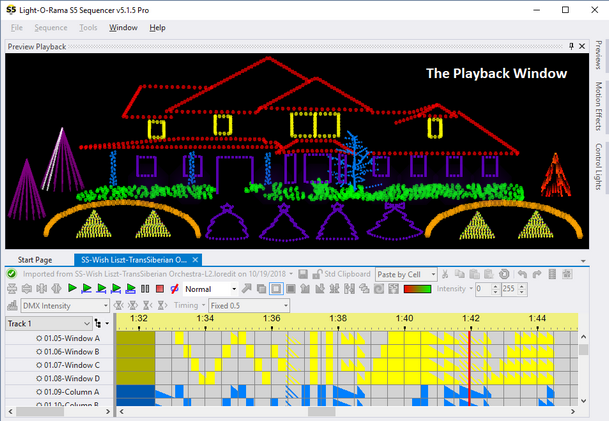
The Playback Window displaying a simulation of the lights while the sequence is being played
You can right-click on the window and get a pop-up menu to start and stop playback. If your preview has a background image, this menu can also be used to change the brightness of the image.
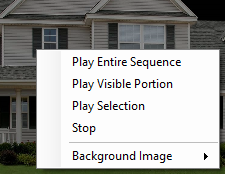
The right-click menu
Displaying Motion Effects
If you have the Pro version and are using motion effects, the playback window has a second purpose: it displays the currently selected motion effect. So if you use a lot of motion effects, you will want to keep the playback window visible at all times. This allows you to click on any motion effect in the grid and have it play in the playback window. This makes it much faster to identify motion effects on the sequence grid.
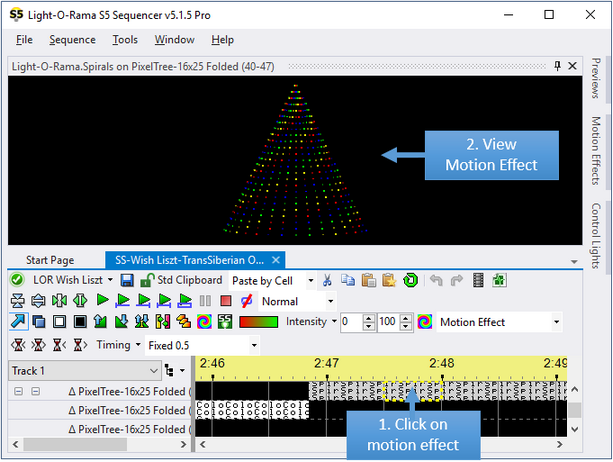
The Playback Window displaying a motion effect