What Is A Subsequence?
A subsequence is a sequence that is used as a part of another sequence (its "parent sequence", or "the main sequence"). Subsequences are displayed with a "§" prefix in the sequence grid.
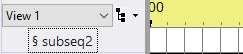
A subsequence
A sequence grid row for a subsequence can be turned on and off, using the Sequencer, in the same ways that other channels can be. When the channel in the main sequence is turned on, the subsequence will begin playing, from its beginning. It will continue playing for as long as the channel remains on; if play of the subsequence reaches its end before the channel has been turned off in the main sequence, the subsequence will simply loop back to its beginning and continue playing.
When the channel in the main sequence is turned off, the subsequence will stop playing. If the channel is subsequently turned back on, the subsequence will start playing again, from its beginning (not from the last point that it left off at).
In S5, the effects contained in a subsequence will be displayed in the playback window while the sequence is being played. This is different from prior versions.
Tip: Do not set up the same physical unit and circuit to be a channel in a sequence and a channel in a subsequence of that sequence (or two channels in two different subsequences of a sequence). Doing so will likely cause unexpected and undesired results, as the two channels compete for control over the same physical circuit.
Note: If a sequence with a Windows shell command is used as a subsequence, that command will not be executed. Only the shell command associated with the main sequence (if any) will be executed.
How Are They Created?
A subsequence can be created by selecting "Subsequence" from the "Add New" item on the Sequence menu or on the Grid View menu.
Right-click on a subsequence's name and select "Modify Subsequence" to change its name, color, or referenced sequence file.
Right-click on a subsequence's name and select "Delete Subsequence" to remove it completely from the sequence.